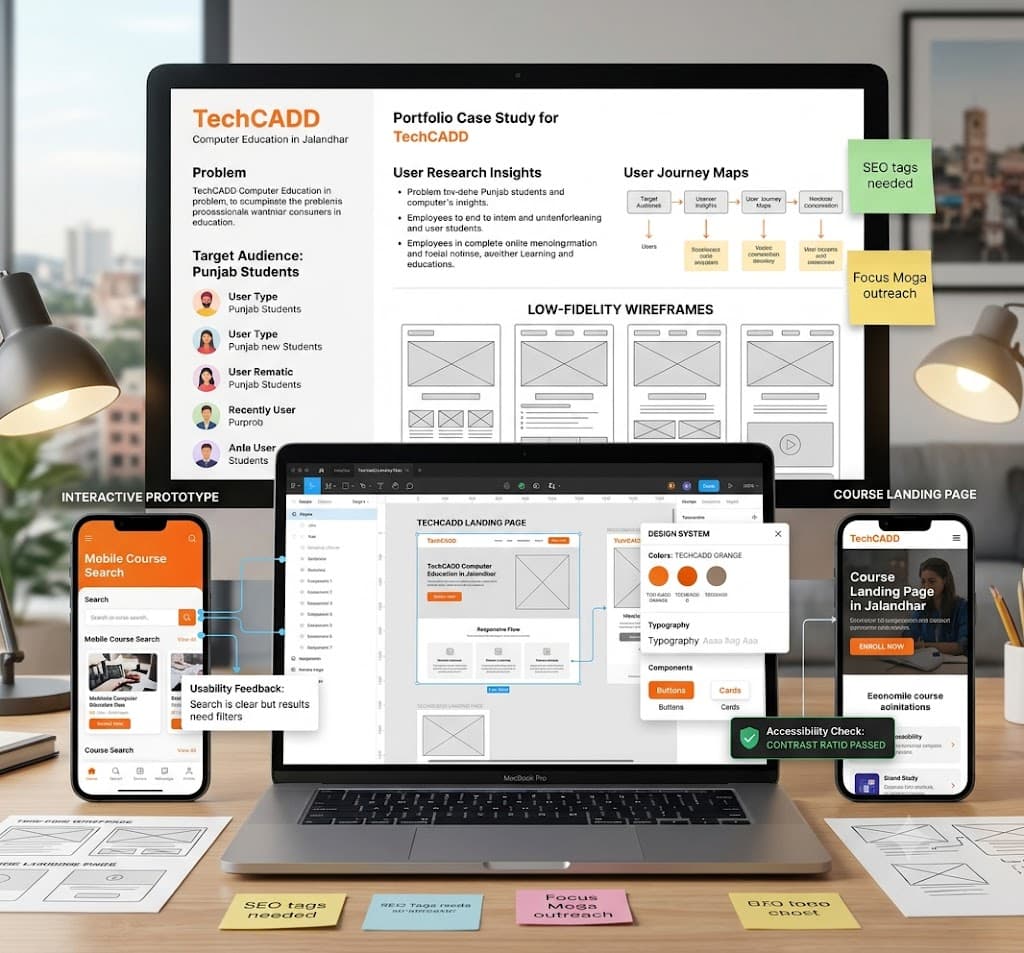
6 month UI UX training in Hoshiarpur
Accurate digital product design helps organisations understand user needs, map user journeys, design intuitive interfaces, ensure responsive experiences, and measure usability performance. Design software supports this work by organising wireframes, interface components, prototypes, and design systems. However, reliable results depend on the designer's foundational knowledge, research depth, and attention to user feedback.
Learning UI UX Design and Product Strategy in Hoshiarpur involves connecting design fundamentals with practical software tools and user-centered methodologies. Students need to understand user behavior, select suitable design patterns, test interactive prototypes, and review usability testing metrics.
Learners can contact Techcadd Hoshiarpur to discuss their educational background, career goals, and available 6-month training options. A structured approach helps beginners develop confidence through realistic project portfolios rather than relying entirely on memorised tool shortcuts.
What Is UI/UX Design?
UI/UX design encompasses user interface (UI) design and user experience (UX) design to create digital products that are visually appealing, functional, and easy to navigate. Depending on the project requirements, scope, and target audience, users can work with wireframing, user research, interaction design, and interface assets.
Learning the design process begins with understanding how user problems are represented in research insights. A user pain point, feature requirement, or navigation flow needs appropriate user testing and structural classification.
A 6-Month UI UX Course in Hoshiarpur can introduce:
Setting up a professional design workspace.
Conducting user research and persona creation.
Designing wireframes and information architecture.
Creating interactive prototypes and UI components.
Maintaining scalable design systems.
Reviewing accessibility and usability reports.
Managing organised asset handoffs.
Software makes visual creation easier to process, but it does not replace design judgement and user empathy.
What Does UI/UX Management Involve?
Design management involves organising the information and processes needed to support end-to-end product development. It connects user research, wireframes, component libraries, stakeholder feedback, and preparation for development handoff.
Students should understand that applying a trendy color palette is only one part of the process. The user's workflow, accessibility guidelines, and technical feasibility also need attention.
UI/UX Training in Hoshiarpur can introduce:
Reviewing user feedback and survey information.
Maintaining component and design token records.
Checking wireframe consistency across screen sizes.
Recording documented design iterations.
Comparing usability metrics across sources.
Preparing design review schedules.
Tracking unresolved UX friction points.
The aim is a clear, traceable workflow in which interface decisions can be connected with user research and business goals.
Why Learn UI and UX Together?
Visual interface design and user experience research depend on the same underlying user needs and product constraints. Studying them together helps learners understand how a layout change affects user flows, accessibility standards, and final product success.
For example, a dashboard design exercise can involve reading user requirements, mapping user flows, wireframing layouts, designing high-fidelity screens, and preparing information for developer handoff.
A 6-Month UI/UX Course in Hoshiarpur can help develop:
Practical design thinking understanding.
Accurate component-building habits.
Familiarity with product documentation and style guides.
Confidence in presenting design solutions.
Better discrepancy-identification and critique skills.
Clearer communication with developers and stakeholders.
Learning becomes more useful when students follow complete design workflows instead of practising isolated screens without checking their usability impact.
Who Can Learn UI/UX Design?
UI/UX learning can suit students and professionals with different starting points. Creative knowledge may help, but beginners can start with design foundations before moving into advanced prototyping exercises.
Potential learners include:
Design and art students.
Graduates exploring product design and frontend support work.
Web developers looking to improve interface skills.
Graphic designers transitioning to digital products.
Entrepreneurs designing their own applications.
Professionals refreshing practical portfolio skills.
Before selecting UI/UX Classes in Hoshiarpur, discuss prerequisites, software access, project assignments, and the expected starting level. Learners should understand whether the training begins with core design theories or assumes previous software experience. This makes it easier to identify a suitable learning path and prepare effectively.
Build Strong Design Foundations
Software operations make more sense when learners understand color theory, typography, visual hierarchy, grid systems, whitespace, and the purpose of user-centered design principles.
Students should learn how an interface element affects user attention and why the design must reflect the user's mental model accurately.
A Basic UI/UX Design Course in Hoshiarpur can introduce:
The design thinking framework.
Information architecture and card sorting.
Low-fidelity wireframing.
User flow diagrams.
Responsive grid systems.
Typography and color psychology.
Basic usability evaluation.
Use straightforward examples first. Understanding the underlying user intent helps students recognise an unsuitable layout even when the software allows the component and the visuals appear clean.
Setting Up a Design Project
Initial file setup influences later design iterations, so beginners should approach it carefully. Use a fictional product brief with clearly defined user requirements for training.
Record the target audience details, relevant brand guidelines, project scope, and the scope of the exercise. Review layout settings before creating large component libraries.
Useful setup habits include:
Following consistent naming conventions for layers and frames.
Recording design assumptions and user problems.
Checking grid alignment and spacing tokens.
Separating practice artboards from final deliverables.
Confirming which device breakpoints the exercise requires.
Saving a version history backup before major redesigns.
Students exploring Practical UI/UX Training in Hoshiarpur should understand why a specific layout pattern is needed rather than copying it from another app without examining suitability.
Creating Wireframes and Layouts
Wireframes organise user journeys into meaningful structural layouts. Component libraries help maintain consistency across screens and devices.
Incorrect layout choices can affect many later screens, making this an important area for practical review. Students should understand the purpose of each component and how it relates to the user journey.
Practice activities include:
Creating low-fidelity user flow wireframes.
Setting up global typography and color styles.
Reviewing component auto-layout rules.
Checking design elements against supplied user briefs.
Avoiding unnecessary duplicate components.
Correcting documented layout mistakes.
A clear naming approach makes design files easier to understand for developers. Similar style names should not be used casually when they could cause team members to select the wrong component during handoff.
Designing User Interfaces and Visuals
UI design and visual styling connect brand identity with user interaction records. Learners need to read the complete creative brief and identify user expectations before selecting color themes or drafting interface elements.
UI Design Training in Hoshiarpur can include:
Designing responsive mobile and desktop screens.
Preparing sample dark-mode variations.
Distinguishing primary, secondary, and tertiary actions.
Checking contrast ratios for accessibility.
Reviewing typography scales and padding.
Inspecting component states (default, hover, active, disabled).
After design creation, compare the interface with the user brief and brand guidelines. Then review the complete user flow. This multi-stage check helps identify usability flaws that may not be obvious from a single artboard alone.
Prototyping, Interactions, and User Testing
Static screens and interactive user flows are different deliverables. Similarly, designing a layout does not necessarily mean the user can navigate it intuitively.
Students should understand how prototyping triggers affect user experience and how to simulate realistic app interactions.
Useful exercises include:
Linking frames with interactive transitions.
Setting up overlay menus and modals.
Reviewing micro-interactions and animations.
Checking touch target sizes for mobile devices.
Identifying broken navigation paths.
Preparing a usability testing script and feedback log.
Accurate prototypes support user testing and developer handoff. Avoid hiding broken links simply to make the prototype look finished. Gaps need user testing feedback and, where necessary, layout revisions.
Design Systems and Component Libraries
Design systems connect reusable components, design tokens, documentation, and scalability. It requires consistent naming conventions and careful handling of component variants.
A UI/UX Design Systems Course in Hoshiarpur can introduce:
Creating sample master components and variants.
Defining appropriate design tokens.
Organizing asset libraries and asset sharing.
Connecting wireframes with reusable components.
Reviewing responsive auto-layout structures.
Comparing component outputs with accessibility standards.
Start with a small design system so students can trace changes easily. Check whether the visual style and component structure have both been represented appropriately. Page layouts may look clean while individual components contain broken constraints, so review detail as well as global styles.
Understanding User Research and UX Strategy
UX strategy and user research setup should reflect the product goals and target audience. Learners need to understand the purpose of user data collected and the consequences of ignoring user research.
UI/UX Research Training in Hoshiarpur can introduce the use of user interviews, surveys, empathy maps, journey mapping, and usability testing sessions within a controlled project dataset.
Students should practise:
Reading the supplied product briefs.
Checking relevant user demographic details.
Reviewing usability testing insights.
Comparing user feedback with design hypotheses.
Identifying core user pain points.
Documenting recommendations for product improvement.
Design trends and user expectations can change. Training should develop the habit of consulting current industry benchmarks and accessibility standards instead of relying only on remembered examples.
Wireframe Review and Usability Evaluation
Design evaluation requires accurate feedback and a clear connection between user friction points and the underlying interface. Learners should check readability, visual hierarchy, navigation clarity, and accessibility compliance.
A UX Evaluation Course in Hoshiarpur can use fictional apps containing deliberate usability and accessibility mistakes.
Useful checks include:
Correct touch target sizes and spacing.
Consistent navigation structures.
Appropriate text contrast ratios.
Clear call-to-action descriptions.
Agreement between user goals and interface design.
Accurate references to design system tokens.
Read through user testing notes before approving a design. Missing accessibility considerations should be investigated through structured audits rather than supplied through assumptions. A professional-looking screen still needs careful usability testing.
Design Iterations, Redesigns, and Edge Cases
Digital products may change after initial user testing. Layouts can fail on smaller screens, user feedback may reveal confusion, or a usability audit may require a documented correction.
Students should understand how a design iteration relates to original research and how it affects user flows and developer handoff.
Practical activities include:
Identifying the original usability problem.
Recording the design rationale for changes.
Checking accessibility compliance.
Maintaining version control references.
Reviewing the impact on existing component libraries.
Listing matters requiring further user testing.
Do not delete or overwrite previous artboards merely to force agreement between design versions. A traceable iteration process makes portfolio presentation easier and helps explain why the product evolved.
Usability Testing and Accessibility Review
Usability evaluation compares information from user sessions and investigates pain points. Students can begin by matching user behavior with design goals before progressing to WCAG accessibility compliance standards.
Official UX guidance advises designers to test prototypes with real users and verify screen reader compatibility and contrast ratios.
UX Testing Training in Hoshiarpur can cover:
Comparing task success rates across user groups.
Finding missing or confusing UI copy.
Checking visual accessibility issues.
Recording unresolved usability bottlenecks.
Preparing follow-up design adjustment schedules.
Documenting research conclusions.
Visual design and accessibility compliance are separate questions. A screen looking visually appealing does not remove the need to assess keyboard navigation and screen reader requirements.
Reviewing Portfolios and Preparing Handoff
Portfolios help students showcase their design process to potential employers. Beginners should learn to move between high-level case studies and the detailed wireframes behind them.
Useful practice deliverables include user journey maps, wireframe flows, high-fidelity prototypes, and developer handoff documentation. The available portfolio artifacts depend on the project scope and tools used.
Learners should ask:
Does the case study explain the problem clearly?
Are all research insights connected to design decisions?
Can design choices be traced back to user feedback?
Are responsive states reflected appropriately?
Do unresolved usability questions remain?
What needs further refinement before publishing?
Portfolio presentation should produce clear, understandable storytelling. Add clear notes about design challenges and constraints instead of presenting an incomplete mockup as a finished product.
Collaborative Tools for Supporting Work
Collaborative design tools are useful for wireframing, prototyping, design systems, feedback comments, and developer handoff notes. They should support a clear workflow rather than become an unstructured collection of random artboards.
Important beginner skills include:
Consistent layer and frame naming.
Auto-layout and constraint settings.
Prototyping connections and smart animations.
Organizing pages and sections cleanly.
Using component variants effectively.
Checking design handoff inspect panels.
Separating exploration drafts from production screens.
After sharing or exporting design files, review several screens to confirm that interactive links and constraints remain functional. A neat workspace may still contain broken padding or unlinked flows. Document the research background, target audience, and project goals so developers and stakeholders can understand the solution.
Practical Projects and Professional Habits
A complete 6-month product design exercise helps learners connect user research, wireframing, UI styling, prototyping, design systems, and portfolio presentation.
Useful assignments include organizing user research briefs, creating low-fidelity wireframes, designing high-fidelity UI systems, conducting usability tests, preparing developer handoff documentation, and writing a comprehensive case study.
Keep training files organised and separate from live client projects. Protect sensitive user data and follow agreed design system standards.
Professional habits also include meeting milestone deadlines, incorporating critique constructively, preserving version backups, and explaining design decisions clearly. These behaviors make software knowledge more valuable within a product team. Progress should be demonstrated through well-researched, accessible design work rather than the number of screens completed.
Explore Learning Options with Techcadd
When discussing a Techcadd UI/UX Design Course in Hoshiarpur, explain your current creative background and the career roles you want to target with confidence.
Ask about design fundamentals, software versions (such as Figma and Adobe XD), practical project datasets, mentor feedback, and portfolio reviews. Confirm course duration, batch timings, equipment requirements, fees, and any certification details directly with techcadd.
A suitable learning plan should help students explain design rationales, conduct user interviews, prototype interactive flows, and recognize accessibility issues needing further attention. Clear expectations make it easier to assess progress through completed project portfolios and choose relevant career next steps.
Conclusion
Learning UI/UX Design and Product Strategy in Hoshiarpur can provide a foundation in user research, interface design, prototyping, design systems, and usability evaluation. Reliable work combines software proficiency with empathy for users, structured research, and thoughtful iteration.
Contact Techcadd Hoshiarpur to discuss relevant 6-month training options. Practise complete design workflows, investigate usability feedback carefully, and develop the confidence to support routine product design responsibilities while recognising when additional guidance is required.